How to set up Google Analytics goals for your WordPress site sets the stage for optimizing your website’s performance. This guide delves into the critical steps for defining and implementing goals within Google Analytics, tailored specifically for WordPress websites. From understanding different goal types to integrating tracking seamlessly, we’ll cover everything you need to know to gain valuable insights into your site’s success.
This comprehensive guide will walk you through defining key performance indicators (KPIs), setting up various goal types within Google Analytics, and implementing the necessary tracking on your WordPress site. We’ll explore methods for integrating Google Analytics tracking code, using plugins, and configuring goal parameters and attributes, as well as analyzing goal performance data to refine your strategies.
Introduction to Google Analytics Goals for WordPress Sites
Google Analytics is a powerful tool for understanding website traffic and user behavior. However, simply seeing visitor numbers isn’t enough to truly gauge the success of your WordPress site. Setting up goals in Google Analytics allows you to track specific actions users take on your site, such as making a purchase, filling out a form, or downloading a resource.
This targeted approach gives you a clear picture of what’s working and what needs improvement, enabling data-driven decisions for optimizing your website strategy.
Defining and tracking goals in Google Analytics provides actionable insights. By understanding user journeys and identifying key conversion points, you can tailor your website content, marketing efforts, and overall strategy to achieve better results. This is crucial for WordPress site owners who want to measure the effectiveness of their online presence and make informed decisions about how to improve their site’s performance and achieve their business objectives.
Significance of Defining Goals
Clear goals are essential for any website, but particularly for WordPress sites. They serve as a roadmap, guiding your content creation, marketing campaigns, and website design. Knowing precisely what you want users to do—e.g., subscribe to a newsletter, download a white paper, or make a purchase—allows you to optimize your site’s structure and content to encourage those actions.
Different Types of Google Analytics Goals
Google Analytics offers various goal types, each designed to track different user actions. Understanding the nuances of these goal types allows for precise tracking of crucial website interactions.
| Goal Type | Description | Use Case for WordPress Sites |
|---|---|---|
| Destination | Tracks when a user reaches a specific page (e.g., a thank-you page after a form submission). | Tracking completion of a contact form, confirming a purchase, or finishing a lead generation process. |
| Duration | Measures the time a user spends on your site or within a specific section. | Determining how long visitors spend on product pages, blog posts, or specific landing pages to assess engagement. |
| Pages/Screens | Tracks the number of pages or screens a user visits. | Analyzing user engagement with a series of blog posts, understanding if visitors navigate to related resources, or assessing the depth of engagement with different product categories. |
| Events | Tracks specific actions performed on your site, such as button clicks, video plays, or file downloads. | Measuring the effectiveness of calls-to-action, monitoring user interaction with multimedia content, or assessing engagement with downloadable content. |
Defining Your WordPress Site Goals
Setting up Google Analytics goals for your WordPress site is crucial for understanding its performance and achieving your business objectives. A well-defined goal structure helps you track progress, identify areas needing improvement, and ultimately make data-driven decisions to boost your site’s success. This section dives into the essential steps of defining your WordPress site goals, tailoring them to your specific needs, and aligning them with your overall business strategy.
Figuring out Google Analytics goals for your WordPress site can be tricky, but it’s crucial for understanding visitor behavior. Think about what actions you want visitors to take, like making a purchase or filling out a contact form. Once you’ve established clear goals, you can better tailor your site’s messaging and content. This ties into how to effectively communicate a unified brand identity after a merger or acquisition; how to convey a unified brand message after a merger or acquisition is essential.
Ultimately, understanding user behavior via Google Analytics goals will allow you to make better, more informed decisions for your WordPress site’s design and strategy.
Key Performance Indicators (KPIs) for WordPress Sites
Identifying the right Key Performance Indicators (KPIs) is fundamental to measuring success. KPIs are quantifiable metrics that track progress towards specific goals. For a WordPress site, these can range from simple page views to complex conversion rates. The choice of KPIs depends heavily on the type of website and its objectives. For instance, an e-commerce site might prioritize conversion rates and average order value, while a blog might focus on unique visitors and engagement metrics like time on site.
Aligning Goals with Business Objectives
Your WordPress site goals should be intrinsically linked to your overall business objectives. If your business aims to increase brand awareness, your site goals should reflect that. If you’re focused on driving sales, your goals should be geared towards conversions. Understanding your business strategy is paramount in selecting appropriate KPIs and crafting meaningful goals.
Potential Goals for Different WordPress Site Types
Different types of WordPress sites require different sets of goals. The table below Artikels potential goals for various website types:
| Site Type | Potential Goals |
|---|---|
| E-commerce | Conversion rate, average order value, cart abandonment rate, customer acquisition cost |
| Blog | Unique visitors, page views, time on site, bounce rate, social media shares |
| Portfolio | Downloads, contact form submissions, lead generation, website traffic |
| Service-based | Appointment bookings, lead generation, contact form submissions, newsletter sign-ups |
Examples of Specific Goals
To illustrate, consider these specific goals for different site types:
- E-commerce: Increase the conversion rate by 15% within the next quarter. This could be measured by tracking the percentage of visitors who complete a purchase.
- Blog: Achieve 10,000 unique visitors per month within the next three months. This goal could be tracked through the number of unique users visiting the site each month.
- Portfolio: Generate 20 qualified leads per month through the contact form. This could be measured by counting the number of people who submitted the contact form with information indicating their interest in the services or products.
Tailoring Goals to Unique Needs
No two WordPress sites are identical. Your goals should be tailored to your specific needs and circumstances. Factors like target audience, industry, and unique selling propositions should all influence your goal setting. Consider the specific value proposition of your site and what actions you want visitors to take. For example, if you’re a local business, your goals might center on driving foot traffic to your physical location, while a SaaS company might focus on free trial sign-ups and customer retention.
Comparing Goal Types
Different goal types have varying degrees of applicability to WordPress websites. Understanding these differences is key to setting effective goals. A comparison of goal types and their suitability for WordPress websites is presented in the table below.
| Goal Type | Description | Applicability to WordPress |
|---|---|---|
| Destination | Tracks visits to a specific page. | Highly applicable for e-commerce (e.g., product pages, checkout pages), lead generation (e.g., contact forms), and blogs (e.g., specific articles). |
| Duration | Tracks the time spent on a site. | Useful for measuring user engagement on blog posts, product pages, and other site content. |
| Pages/Screens per Session | Tracks the number of pages visited during a single session. | Applicable for understanding user behavior, assessing site navigation, and determining if visitors are finding the information they need. |
| Event | Tracks specific user actions, like button clicks or video plays. | Highly applicable for tracking user interactions with interactive elements on the site, such as call-to-action buttons, downloads, and embedded videos. |
Setting Up Goals in Google Analytics
Now that you’ve defined your goals for your WordPress site, it’s time to set up tracking in Google Analytics. This crucial step allows you to monitor progress towards achieving those objectives. Setting up goals properly is essential for understanding what’s working, what’s not, and how to optimize your site for maximum performance.
This section provides a detailed guide on setting up various goal types within Google Analytics, ensuring you can accurately track key metrics relevant to your WordPress site’s performance. We’ll explore different tracking methods and highlight the essential parameters to consider during setup.
Creating Different Goal Types
Google Analytics offers several goal types to track different actions on your website. Each goal type is designed to measure specific user interactions, allowing for tailored analysis and reporting. Understanding these variations will empower you to define goals aligned with your specific objectives.
Step-by-Step Goal Setup
Follow these steps to set up a goal in Google Analytics:
- Log in to your Google Analytics account and navigate to the “Admin” section.
- Select the view for your WordPress site.
- Click on “Goals” in the left-hand menu.
- Click “New Goal”.
- Choose the goal type that best aligns with your objective (e.g., destination, duration, pages/screen, event).
- Enter the necessary details for the chosen goal type. This might include a destination URL, the duration of a session, specific pages visited, or an event trigger.
- Review the settings to ensure accuracy and save the goal.
- Implement the tracking code on your WordPress site if necessary, depending on the chosen goal type.
Essential Elements for Goal Setup
Careful consideration of these elements during the setup process is crucial for accurate and meaningful data collection:
- Specificity: Define the exact actions you want to track. For example, instead of “purchase,” specify “purchase of a premium theme.”
- Accuracy: Ensure that the goal accurately reflects the desired user behavior.
- Relevance: Choose goals that align with your business objectives and site strategy.
- Clarity: Make sure the goal definition is easily understood and interpreted.
- Testing: Thoroughly test the setup to ensure accurate tracking of the defined goal.
Tracking Goals on a WordPress Site
Different methods exist for tracking goals on a WordPress site, depending on the goal type. This allows for flexible and targeted data collection.
- UTM Parameters: Use UTM parameters to track traffic sources and campaigns when a goal is triggered.
- Custom JavaScript: For custom events, implement JavaScript to send data to Google Analytics.
- WordPress plugins: Plugins can simplify the process of tracking specific goals like form submissions or e-commerce transactions.
Goal Parameter Configuration
Configuring parameters and attributes for your goals is vital for a more granular understanding of user behavior. This enables deeper analysis of user interactions with your site.
- Destination URL: For destination goals, specify the exact URL that marks completion.
- Duration: Define the minimum session duration to qualify as a goal completion.
- Pages/Screens: Specify the required sequence of pages to fulfill the goal.
- Event: Configure events to trigger goals, like button clicks, form submissions, or video views.
Comparison of Goal Types, How to set up google analytics goals for your wordpress site
| Goal Type | Description | Steps to Create |
|---|---|---|
| Destination | Tracks when a user reaches a specific page. | Specify the destination URL. |
| Duration | Tracks sessions that exceed a specified duration. | Set the minimum session duration. |
| Pages/Screens | Tracks when a user visits a specific sequence of pages. | Define the required page sequence. |
| Event | Tracks user interactions with custom events. | Define the event category, action, and label. |
Implementing Goals on Your WordPress Site
Integrating Google Analytics tracking into your WordPress site is crucial for understanding user behavior and optimizing your website’s performance. This process ensures that the data collected from your site is accurately reflected in your Google Analytics dashboards, enabling informed decisions based on concrete insights. Proper implementation allows you to track specific actions related to your defined goals, providing a clear picture of how users interact with your site.The correct integration of your Google Analytics tracking code with your WordPress website is vital for the accurate measurement of website performance.
Setting up Google Analytics goals for your WordPress site is crucial for tracking success. Understanding which aspects of your site are performing best, like blog posts or specific product pages, is vital. Interestingly, a recent study on how some law firms saw impressive growth of 26% during challenging economic times, high growth in hard times new study shows how some law firms grew 26 while others suffered , highlights the importance of focused strategies.
Ultimately, achieving those goals in your own WordPress site requires careful planning and analysis, so dive into those Google Analytics goals!
This enables you to gather valuable insights into user behavior and actions. This data is fundamental to making data-driven decisions for improving your site’s functionality and user experience.
Integrating Tracking Code with WordPress
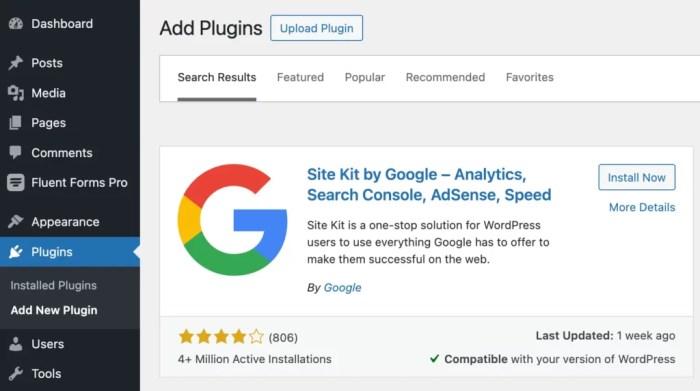
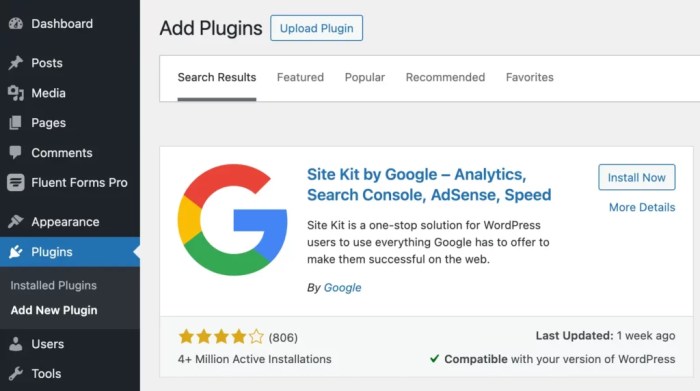
The fundamental step in implementing Google Analytics involves adding the tracking code to your WordPress site. This code snippet tracks user interactions, such as page views, events, and conversions, sending the data to your Google Analytics account. The process is relatively straightforward, and various methods are available to ensure seamless integration.
Setting up Google Analytics goals for your WordPress site is crucial for tracking your website’s performance. Knowing how many visitors convert to paying customers is key, especially when you’re looking to expand your online presence, like by selling on platforms like expanding your ecommerce business with walmart com. Once you understand these conversions, you can fine-tune your strategy to maximize sales.
This data will ultimately help you refine your marketing and sales approach, leading to better results.
Using WordPress Plugins
WordPress plugins offer a user-friendly approach to integrating Google Analytics tracking. These plugins automate the process of adding and managing tracking codes, simplifying the implementation for users of all technical skill levels. They often provide additional features, such as custom dashboards and reports tailored to your specific needs.
Popular WordPress Plugins for Google Analytics Integration
| Plugin Name | Key Features | Pros | Cons |
|---|---|---|---|
| MonsterInsights | Comprehensive tracking, customizable dashboards, advanced reporting options, and compatibility with various WordPress themes. | Highly versatile, extensive reporting features, and ease of use. | Can be resource-intensive for less demanding sites. |
| Easy Google Analytics for WordPress | A user-friendly plugin that streamlines the process of setting up and managing Google Analytics tracking. | Simple setup, effective for basic tracking needs. | Limited customization options compared to more advanced plugins. |
| WP Statistics | Provides detailed statistics about website traffic, including visitor demographics, geographic locations, and referring sites. | Clear and concise reports, useful for understanding visitor patterns. | May not be as comprehensive as dedicated analytics plugins. |
| Matomo | A self-hosted open-source alternative to Google Analytics. | Complete control over data, aligns with privacy concerns, and excellent flexibility. | Requires more technical expertise for setup and maintenance. |
Implementing Tracking Code for Different Goals
Integrating the tracking code varies depending on the specific goal you want to track. For instance, if the goal is to track sales, you might use event tracking to monitor purchases. For lead generation, you might track form submissions. Each goal necessitates a different implementation approach within the chosen plugin. Thorough understanding of the goal types and their corresponding tracking methods is essential for accurate reporting.
Implementing for Different WordPress Theme Types
The implementation process for various WordPress themes is largely consistent. Most themes allow you to add tracking code to the header or footer sections of your website. Consulting the theme’s documentation is helpful for identifying the appropriate location for embedding the code. Themes with dedicated hooks or custom functions will often specify a particular insertion point. If a theme lacks clear documentation, consulting a developer is often a good idea.

Tracking and Analyzing Goal Performance
Once you’ve set up your Google Analytics goals, the real work begins: monitoring their performance. Understanding how your site visitors interact with your defined goals is crucial for optimizing your strategy and achieving your business objectives. This involves digging into the data, interpreting trends, and identifying areas for improvement.Regularly checking your goal performance allows you to see what’s working, what’s not, and adapt your approach accordingly.
A thorough analysis of your data helps you make informed decisions to maximize your website’s effectiveness in achieving its intended goals.
Monitoring Goal Performance in Google Analytics
Google Analytics provides a wealth of data to monitor goal performance. Access the “Conversions” report to view overall goal completion data. Drill down further into specific goals to see detailed performance metrics. This granular view allows you to spot patterns, identify successful strategies, and diagnose any roadblocks preventing optimal performance.
Interpreting Goal Completion Rates
Goal completion rates reveal the percentage of users who successfully complete a desired action on your website. A high completion rate signifies a strong user experience, efficient calls to action, and effective strategies. A low completion rate indicates potential issues that need investigation. For instance, a low conversion rate for a specific goal might point to a poorly designed landing page or a confusing user journey.
Understanding the context behind these rates is key to identifying and fixing problems.
Common Goal Performance Metrics and Interpretations
A range of metrics help interpret goal performance. The conversion rate, the percentage of users who complete a goal, is a primary metric. Bounce rate, the percentage of visitors who leave your site after viewing only one page, can be an indicator of problems with the user experience or navigation. Average session duration shows the average time spent on your site, which correlates with engagement.
Tracking Goal Conversions and Their Sources
Tracking goal conversions and their sources helps understand which marketing channels or campaigns drive the most successful conversions. By examining the traffic sources associated with goal completions, you can determine which channels are most effective and allocate resources accordingly.
Using Reports and Dashboards to Monitor Goal Performance
Google Analytics offers various reports and customizable dashboards to monitor goal performance. These tools allow you to visualize key metrics, track progress, and identify trends over time. Custom dashboards can be created to consolidate crucial metrics, providing an at-a-glance view of your website’s performance in relation to your goals.
Available Reports for Tracking Goal Performance
| Report | Description |
|---|---|
| Conversions | Provides a comprehensive overview of goal completions, including the total number of conversions, conversion rate, and other relevant metrics. |
| Conversion Paths | Reveals the steps users take to complete a goal, highlighting popular paths and identifying any drop-offs in conversion rates. |
| Traffic Sources | Links goal completions to specific traffic sources, such as organic search, social media, or paid advertising, to understand which channels contribute most to achieving your goals. |
| Landing Pages | Analyzes the performance of different landing pages, identifying high-performing and underperforming pages in relation to goal completions. |
| Attribution | Helps you understand the different channels contributing to conversions. This provides crucial insights for optimizing your marketing strategies. |
Optimizing Your WordPress Site for Goal Achievement
Once you’ve set up your Google Analytics goals, the real work begins – optimizing your WordPress site to achieve those goals effectively. This involves a multifaceted approach focusing on improving user experience, understanding conversion bottlenecks, and continuously testing and refining your website’s design and functionality. A well-optimized site will not only increase conversions but also provide a more positive and engaging experience for your visitors.Improving conversion rates requires a strategic and data-driven approach.
This involves analyzing user behavior, identifying areas for improvement, and implementing changes that directly impact goal completion. Crucially, these improvements should be continuously monitored and adjusted to ensure maximum effectiveness.
Strategies for Improving Goal Conversion Rates
Effective conversion rate optimization (CRO) hinges on understanding user behavior and anticipating their needs. This involves meticulous analysis of website traffic, identifying patterns, and implementing changes based on observed trends. A/B testing plays a vital role in this process, allowing you to compare different versions of your website elements to see which performs best in achieving your goals.
A/B Testing and its Role in Goal Optimization
A/B testing is a powerful tool for optimizing your WordPress site. It allows you to test different variations of website elements, such as headlines, call-to-actions, and images, to see which performs better in achieving your goals. For example, you might test two different headline options for a landing page to see which generates more conversions. By systematically testing and comparing variations, you can refine your website design to better meet the needs of your target audience and improve conversion rates.
This iterative approach is crucial for continuous improvement and maximizing the effectiveness of your website.
Common Issues Preventing Goal Completion and Solutions
Several factors can hinder goal achievement. A slow website loading speed, for instance, can frustrate users and lead them to abandon their intended actions. Similarly, unclear calls to action or a confusing website structure can deter visitors from completing the desired goal. These problems can be addressed by optimizing site speed, creating clear calls to action, and ensuring a user-friendly website structure.
Poor mobile responsiveness can also significantly impact goal completion, requiring a mobile-first design approach.
The Importance of User Experience in Goal Achievement
A positive user experience is paramount for achieving your website goals. Users are more likely to convert if they find your site easy to navigate, visually appealing, and informative. A seamless and intuitive experience directly correlates with higher conversion rates. Understanding user needs and adapting the site to those needs is key to improving user experience and ultimately achieving goals.
Factors Impacting Goal Conversion Rates
Numerous factors influence conversion rates, including:
- Website loading speed: A slow-loading website can deter users and lead to higher bounce rates.
- Clear call-to-action buttons: Intriguing and well-placed calls to action are critical for prompting conversions.
- Mobile responsiveness: A website that functions smoothly on various devices, particularly mobile devices, is essential for broader user reach.
- Website design: A clean, organized, and visually appealing design contributes to a positive user experience.
- Content quality: High-quality, relevant, and engaging content is essential for attracting and retaining visitors.
- User interface (UI): An intuitive and user-friendly interface can significantly impact conversion rates.
Potential User Experience Issues and Solutions
| User Experience Issue | Solution |
|---|---|
| Slow website loading speed | Optimize images, leverage caching, and use a faster hosting provider. |
| Poor mobile responsiveness | Ensure the website is fully responsive and functions seamlessly across different devices. |
| Confusing website structure | Create a clear and intuitive site navigation. |
| Unclear call-to-action buttons | Make call-to-action buttons prominent and visually appealing. |
| Lack of trust signals | Include security badges, testimonials, and trust indicators. |
Last Word: How To Set Up Google Analytics Goals For Your WordPress Site
In conclusion, setting up Google Analytics goals for your WordPress site is essential for understanding visitor behavior, optimizing website performance, and achieving your business objectives. By implementing the strategies Artikeld in this guide, you’ll gain actionable insights, refine your website strategy, and ultimately drive significant growth. Remember to tailor your goals to your specific website type and objectives for the most effective results.