
Check non copyright pictures using tineye – Check non-copyright pictures using Tineye to avoid legal trouble and ensure your images are safe to use. Tineye is a powerful image search engine that helps you quickly identify similar images, crucial for verifying copyright status. This guide will walk you through the process, from basic searches to advanced techniques, plus helpful resources for copyright-free images and alternatives.
Understanding copyright laws is key to responsible image use. Tineye, a specialized image search engine, allows you to pinpoint similar images to yours and investigate their potential copyright status. This can help determine if the images you’re considering using are truly free to use or have associated copyright restrictions.
Introduction to Tineye and Copyright
Tineye is a powerful reverse image search engine. It allows users to upload an image and find other instances of that image online, including potentially identical or very similar copies. This is incredibly useful for a variety of purposes, from identifying the source of an image to determining if it’s been used improperly. Understanding the implications of copyright is crucial when using Tineye, as it often leads to the discovery of potentially infringing material.Copyright law protects the rights of creators to control how their original works are used.
This protection extends to images, photographs, illustrations, and other visual content. Copyright holders retain the exclusive right to reproduce, distribute, display, and create derivative works based on their copyrighted material. Infringement can occur if someone uses a copyrighted image without the permission of the copyright holder. This often involves a balance between the need for access to information and the need to protect creators’ rights.
Tineye’s Role in Copyright Awareness
Tineye is a valuable tool for verifying image ownership and usage rights. By enabling the rapid identification of similar or identical images, it helps users assess potential copyright issues. Using Tineye can lead to a better understanding of the legal implications of image use. This process can save time and resources by quickly identifying potential problems.
Copyright and Image Usage
Respecting copyright is essential when using images. It’s crucial to understand that using copyrighted material without permission is a violation of copyright law. This violation can lead to legal consequences. It is vital to obtain the necessary permissions or licenses from the copyright holder before using their work. This is particularly important for commercial use or widespread distribution.
Using images ethically and responsibly safeguards against legal issues and demonstrates respect for the rights of creators.
Distinguishing Free-to-Use and Copyrighted Images
Identifying images suitable for use without copyright infringement requires careful consideration. Understanding the differences between free-to-use and copyrighted images is critical.
| Characteristic | Free-to-Use Images | Copyrighted Images |
|---|---|---|
| Source | Licensed under Creative Commons or public domain | Owned by a copyright holder |
| Usage Rights | Generally unrestricted use, often with specific attribution requirements | Limited usage, requiring permission from the copyright holder |
| Attribution | Often required, specifying the original creator | Often required, specifying the original creator and copyright holder |
| Legal Risk | Minimal to no risk of copyright infringement | High risk of copyright infringement without proper licensing |
| Example | Images available on websites like Unsplash, Pixabay | Images from magazines, newspapers, or personal portfolios |
Understanding Tineye’s Image Search
Tineye, a powerful reverse image search engine, offers a unique way to explore the origins and usage of images online. Unlike traditional search engines that rely on s, Tineye focuses on visual similarity, making it invaluable for copyright verification and identifying potential infringements. This approach allows users to quickly pinpoint if an image has been previously published, potentially triggering copyright issues.Tineye works by analyzing the pixels of an uploaded image and comparing it to a massive database of images across the web.
This comparison process identifies similar images, providing insights into the image’s history and potential copyright ownership. The technology leverages sophisticated algorithms to determine visual similarities, even if the image has been altered or slightly modified. This capability distinguishes it from -based searches, making it a unique tool for image verification.
How Tineye Identifies Similar Images
Tineye’s core functionality hinges on its ability to detect subtle visual similarities. It accomplishes this by comparing the pixel data of the uploaded image to its vast database. The system doesn’t just search for identical images; it identifies images that are visually similar, even if they’ve been altered through resizing, cropping, or color adjustments. This allows for the detection of images that might have been derived from an original, protected image.
This is a crucial aspect of copyright verification, as it helps to identify potential infringements even when the infringement isn’t an exact copy.
Ways Tineye Can Be Used for Copyright Verification
Tineye is a powerful tool for copyright verification. Users can upload an image and quickly see if it has been used elsewhere on the web. This can be used to:
- Identify potential copyright infringement: By finding instances of similar images, Tineye helps determine if an image has been copied without permission.
- Verify image origin: Tineye can trace an image back to its source, potentially revealing its original creator and usage rights.
- Assess image licensing: If the image is found on a site with a specific license, Tineye can provide context on the permissible uses.
- Determine image usage on other websites: By comparing the uploaded image to images on other websites, Tineye provides insights into how the image is being used by others, aiding in the assessment of potential copyright infringement.
Limitations of Tineye in Determining Copyright Status
While Tineye is a valuable tool, it has limitations when it comes to definitively determining copyright status.
- Subtle alterations: Tineye may not detect images that have been significantly altered, potentially masking copyright infringement. A heavily edited or transformed image might not be identified as similar to the original.
- Copyright-free images: Tineye’s results don’t indicate whether an image is specifically copyright-free. It only identifies visual similarities.
- Grey areas of copyright: Tineye’s results don’t resolve complex copyright situations, including cases where an image has been used in a derivative work. It’s essential to consider additional factors beyond the search results when assessing copyright.
- Lack of legal interpretation: Tineye is a tool for image identification, not a legal consultant. It does not provide legal opinions on copyright infringement. Consulting with legal professionals is crucial for navigating legal disputes.
Comparing Tineye with Other Image Search Engines
The following table compares Tineye’s search results with those of other prominent image search engines. This comparison highlights Tineye’s strengths in detecting visual similarities.
| Feature | Tineye | Google Images | Bing Images |
|---|---|---|---|
| Search Method | Reverse image search based on pixel comparison | -based search with image results | -based search with image results |
| Visual Similarity Detection | Excellent | Fair | Fair |
| Copyright Verification | Helpful in identifying potential infringement | Limited use in copyright verification | Limited use in copyright verification |
| Ease of Use | Intuitive | Simple | Simple |
Using Tineye to Check for Copyright
Tineye is a powerful tool for identifying potential copyright issues, but it’s not a definitive answer. Understanding its limitations and using it alongside other research methods is crucial for a thorough assessment. This section will provide a practical guide on leveraging Tineye for copyright checks, including the steps to use it, interpreting results, and acknowledging its inherent limitations.Using Tineye for copyright checks involves a multi-faceted approach.
Simply uploading an image to Tineye and seeing a result doesn’t automatically determine copyright status. The results must be interpreted thoughtfully, alongside additional information, to form a complete understanding of potential infringement.
Steps to Use Tineye for Image Similarity Searches
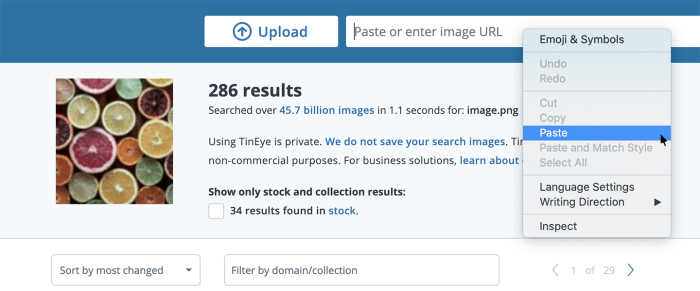
To utilize Tineye effectively, follow these steps:
1. Upload the Image
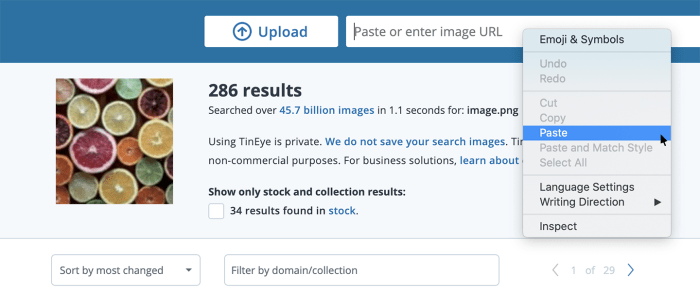
Navigate to the Tineye website and upload the image you want to check. Ensure the image quality is good enough for Tineye to recognize similar patterns.
2. Analyze the Results
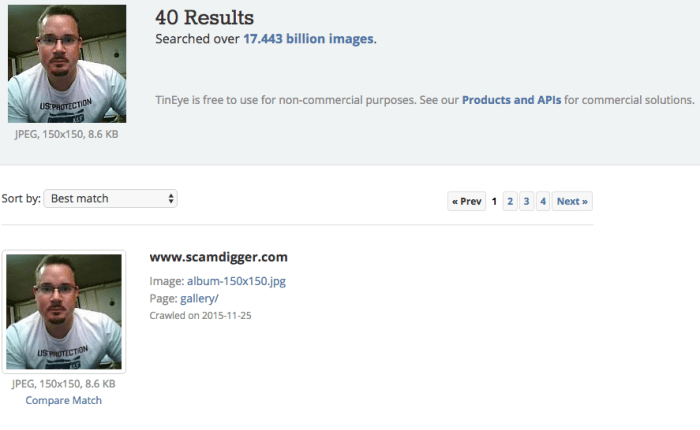
Tineye will display images that are similar to the one you uploaded. These results may show a direct copy, a slightly modified version, or an image inspired by the original.
3. Identify Similar Images
Carefully examine the results. Look for images that have a high degree of similarity to your image. Note the source of these similar images, including the website or platform they are associated with.
4. Document the Findings
Record the URLs of the similar images, and if possible, any additional information about the source, such as the author or date of publication. This information will help in your analysis.
Finding out if a picture is copyright-free is super important, and Tineye is a fantastic tool for that. But did you know that “soft 404s” — the server header status code chain that hurts SEO — can also impact your image searches? This article delves deeper into that, and if your website has issues with 404 errors, it might make it harder to check for copyright-free images with Tineye.
Ultimately, making sure your images are legit and your website is optimized is key.
Interpreting Tineye Results for Copyright Infringement
Tineye results should be interpreted cautiously. A high degree of similarity doesn’t automatically indicate copyright infringement. It simply suggests the potential for a copyright claim.Factors to consider include:
- Similarity vs. Originality: A high degree of similarity may suggest the image was copied or inspired by another. However, it doesn’t necessarily prove infringement. A close resemblance might be due to shared artistic style, or the use of similar elements in different images. Careful judgment is needed to determine if the resemblance constitutes infringement.
- Source of Similar Images: Note the source of the similar images. If the similar images originate from copyrighted works, it could raise concerns about potential copyright infringement.
- Context of Use: Consider the context in which the image is used. A similar image used in a completely different way might not constitute infringement, while a very similar image used in a similar context could be a cause for concern.
Potential Pitfalls and Limitations of Tineye
Relying solely on Tineye for copyright checks can be problematic. Tineye’s results are based on visual similarity, not necessarily on copyright status.
- Subjectivity in Interpretation: The level of similarity can be subjective, leading to different interpretations of the results. What one person deems as similar, another might not. Human judgment is needed to assess the degree of similarity and its potential impact on copyright.
- Lack of Contextual Information: Tineye doesn’t provide information about the copyright status of the images it finds. It only identifies similar visual patterns. Further investigation is necessary to determine if the use of the similar image is permitted by the copyright owner.
- Possible False Positives: Tineye may sometimes identify images as similar when they are not. This could lead to incorrect assumptions about potential copyright infringement.
- Limited Information on Copyright: Tineye does not provide legal advice or copyright status information. It’s essential to consult with legal professionals for a definitive copyright assessment.
Combining Tineye with Other Resources for a Comprehensive Check
A more robust approach involves using Tineye alongside other resources to assess copyright status:
- Copyright Search Engines: Utilize dedicated copyright search engines to identify the original source of the image and understand the copyright owner’s terms of use.
- Image Metadata: Examine the metadata associated with the image, if available. This can provide valuable clues about the original creator and potential copyright holders.
- Legal Consultation: Consult with a legal professional who specializes in copyright law to interpret the findings from Tineye and other resources. This is particularly crucial for determining if the use of the image falls under fair use or other permissible exceptions.
Copyright-Free Images and Alternatives: Check Non Copyright Pictures Using Tineye
Finding images for your projects without copyright issues is crucial for ethical and legal use. This section delves into various avenues for obtaining copyright-free images and understanding the nuances of different licensing options. It emphasizes the importance of verifying licenses before using any image.
Copyright-Free Image Resources
Locating high-quality, royalty-free images is vital for many projects. Numerous websites offer extensive libraries of free-to-use images, each with specific terms and conditions. These resources can significantly reduce the risk of copyright infringement and ensure legal use.
- Pixabay: A popular platform featuring a vast collection of free stock photos, vectors, illustrations, and videos. All content is licensed under Creative Commons Zero (CC0), meaning you can use it commercially and non-commercially without any restrictions. The images are typically high-resolution and suitable for a variety of purposes, from personal blogs to professional websites.
- Pexels: Similar to Pixabay, Pexels provides a vast library of free stock photos. Like Pixabay, all images on Pexels are licensed under Creative Commons Zero (CC0), granting complete freedom for use.
- Unsplash: Known for its high-quality, aesthetically pleasing photos, Unsplash offers free images for personal and commercial use. The majority of the images are licensed under Unsplash’s own license, which is similar to Creative Commons Zero, offering broad usage rights.
- Freepik: A platform providing a blend of free and premium images. The free images are typically licensed under Creative Commons licenses, offering flexible usage options. Freepik often features diverse imagery, from minimalist aesthetics to vibrant scenes.
- Gratisography: A site specializing in high-quality, free stock photos. It emphasizes a curated selection of images that are perfect for projects requiring a distinct aesthetic. Images are licensed under Creative Commons Zero, offering a simple and straightforward usage agreement.
Licensing Options for Images
Understanding the different licensing options is paramount for ethical use. These licenses govern how you can use images, whether commercially or non-commercially, and if you can modify them.
- Creative Commons Licenses: These licenses are widely used for images and other creative works. They offer various permissions, from allowing modifications and commercial use to restricting those uses. For instance, a CC BY license requires attribution to the creator, while a CC0 license offers the most permissive usage rights. The license information is typically clearly displayed on the image or website, enabling users to readily ascertain the permitted uses.
- Royalty-Free Licenses: These licenses permit commercial use without paying ongoing fees. While they usually require a one-time payment or subscription, they allow for commercial use, which is not always the case with Creative Commons licenses. These licenses typically involve a payment for the use of the image. Some royalty-free sites also offer free images.
- Public Domain Images: These images are not subject to copyright restrictions. You can use them freely without any restrictions. They often come from older works or materials whose copyright has expired, which is verified through specific databases. Images in the public domain are ideal for use in a wide range of projects, as they don’t require any specific permissions.
Comparing Licensing Types
A crucial aspect of image usage is understanding the differences between various licenses. A careful comparison can help avoid legal issues and ensure ethical image use.
| Licensing Type | Commercial Use | Modification | Attribution |
|---|---|---|---|
| Creative Commons Zero (CC0) | Yes | Yes | No |
| Creative Commons Attribution (CC BY) | Yes | Yes | Yes |
| Royalty-Free | Usually Yes | Often Yes | Sometimes Required |
| Public Domain | Yes | Yes | Usually Not Required |
Importance of Checking Licenses
Verifying the license of an image is essential before use. Failure to do so could lead to copyright infringement. Thorough verification is necessary to avoid legal issues and ensure ethical use. A simple check of the license can save you significant time and trouble.
Strategies for Finding Copyright-Free Images
Utilizing specific search strategies can make finding copyright-free images more efficient. Using s associated with the license type, such as “CC0” or “Royalty-Free,” alongside other relevant search terms, can greatly improve results.
Free Image Resources Table, Check non copyright pictures using tineye
This table summarizes various free image resources and their terms of use.
| Resource | Licensing | Terms of Use |
|---|---|---|
| Pixabay | CC0 | Commercial and non-commercial use, no attribution required. |
| Pexels | CC0 | Commercial and non-commercial use, no attribution required. |
| Unsplash | Unsplash License | Commercial and non-commercial use, attribution often recommended. |
| Freepik | CC Licenses | Varying licenses, check each image individually. |
| Gratisography | CC0 | Commercial and non-commercial use, no attribution required. |
Advanced Tineye Search Techniques
Tineye, beyond its basic image search functionality, offers powerful tools for advanced users. These techniques allow for deeper exploration of image origins and usage patterns, enabling more sophisticated copyright checks and informed decisions about image sourcing. Leveraging these advanced features can significantly improve the accuracy and efficiency of your copyright research.Image comparison across different sources is a crucial aspect of copyright verification.
Tineye excels in this area by enabling a side-by-side analysis of images from various platforms. This facilitates the identification of potential copyright infringements, as subtle variations can still indicate a derivative work.
Refining Tineye Searches for Similar Images
Tineye’s search algorithm is designed to find images similar to the one you upload. However, sometimes the results might not be as precise as you need. You can refine your search by utilizing alternative image formats, varying the resolution, or focusing on specific sections of the image. For example, if you are searching for a logo, using a cropped image of just the logo will yield more accurate results.
Alternatively, uploading a high-resolution image, if available, will yield more accurate results compared to low-resolution images.
Quick tip for checking images for copyright issues? Using Tineye is a lifesaver! It’s super helpful for finding out if a picture has been used elsewhere before you post it online. To really maximize your social media efforts, consider how managing your organic content can impact your paid campaigns. manage your organic social media to boost your paid performance is key to creating a strong presence.
This knowledge is crucial when using Tineye to make sure your visual content is legally sound and professional.
Image Metadata and Copyright Identification
Image metadata, often invisible to the naked eye, can provide crucial insights into an image’s history and origin. This information can include details about the image’s creation date, location, and even the software used to create it. Tineye, while not displaying all metadata, can sometimes identify these clues, helping you to understand the image’s potential copyright status. By understanding the metadata associated with an image, you can often make more informed decisions about its potential copyright ownership.
Tracking Image Usage Over Time
Tineye’s search results can reveal how an image has been used over time. This is particularly valuable for tracking down instances of unauthorized use or identifying the original source of an image that has been altered or modified repeatedly. By analyzing Tineye’s results, you can potentially pinpoint the exact moment when an image was first used and trace its journey through various online platforms.
This historical perspective can be critical for determining the image’s original copyright holder and usage rights.
Advanced Tineye Search Operators
Tineye doesn’t explicitly use operators in the same way as a search engine like Google. However, you can achieve advanced search capabilities by combining multiple searches or by using specific image criteria. Using alternative image formats or slightly altering the image itself can help narrow your search results. This means using a similar but not identical image to the one you are checking, which helps you identify subtle variations.
| Search Term | Function |
|---|---|
| Similar image | Finds images with high visual similarity. |
| Specific image section | Focuses the search on a particular area of the image. |
| Different resolution | Searches for the same image at varying resolutions. |
| Multiple searches | Combine multiple searches to filter results. |
Legal Considerations and Best Practices
Using images online requires careful consideration of copyright laws. Misusing copyrighted material can lead to significant legal and financial repercussions. This section Artikels the legal implications of image use, emphasizes the importance of permission, and provides best practices for avoiding infringement.Understanding the legal landscape surrounding image usage is crucial for responsible online content creation. This section details the potential consequences of copyright infringement, highlighting the importance of obtaining explicit permission before reusing any image.
It also provides practical strategies for attribution and image licensing to ensure your work remains compliant with copyright laws.
Legal Implications of Using Copyrighted Images Without Permission
Copyright infringement occurs when someone uses a copyrighted image without permission from the copyright holder. This can result in substantial penalties, including financial damages, legal fees, and even injunctions prohibiting further use. The severity of the penalties depends on factors like the extent of infringement, the value of the infringing material, and the intent behind the use.
Importance of Obtaining Explicit Permission Before Using an Image
Always seek explicit permission from the copyright holder before using any image. This applies to images found online, in print publications, or any other source. Permission should be in writing and clearly define the terms of use, including the scope of usage, duration, and any restrictions.
Best Practices for Image Use and Attribution
Proper attribution is essential to avoid copyright infringement. Always credit the original creator or copyright holder whenever you use an image, including the original source and any relevant license information. Use a descriptive caption that accurately reflects the image’s context. A simple but clear citation can save you from potential legal problems.
Comprehensive List of Resources for Learning About Image Licensing
Numerous resources provide information about image licensing and copyright. Check the website of the Creative Commons organization. Many stock photo websites also offer detailed information about their licensing terms. Contacting the copyright holder directly is a crucial step to clarify usage rights and obtain explicit permission.
Potential Consequences of Copyright Infringement
Copyright infringement can result in substantial legal action. This can include lawsuits from copyright holders, resulting in financial penalties, court costs, and a tarnished reputation. In severe cases, copyright holders might seek an injunction to prevent further use of the infringing material. Additionally, online platforms may take action against users who infringe copyright.
Table Summarizing Legal Considerations When Using Images Online
| Legal Consideration | Explanation | Best Practice |
|---|---|---|
| Copyright Infringement | Using copyrighted images without permission. | Obtain explicit written permission. |
| Permission Requirements | Necessity of written authorization from copyright holder. | Clearly define usage terms in the permission agreement. |
| Attribution | Proper acknowledgment of the original creator. | Include a clear and visible attribution with the image. |
| Licensing | Understanding the terms of use for the image. | Carefully review the licensing agreement before use. |
| Potential Consequences | Legal action, financial penalties, and reputational damage. | Prioritize image licensing and seek permission to avoid issues. |
Case Studies of Copyright Infringement
Copyright infringement, a serious issue in the digital age, often involves the unauthorized use of copyrighted images. This can range from simple reproduction to complex adaptations, impacting creators and businesses alike. Understanding how copyright infringement occurs and how to identify it is crucial for maintaining ethical practices in online content creation. Tineye plays a significant role in detecting and preventing such infringement, as well as promoting fair use.Copyright infringement can have various consequences, from legal action and financial penalties to reputational damage.
Identifying potential infringement early, using tools like Tineye, is essential for avoiding these repercussions. This section will delve into specific case studies to illustrate the types of copyright violations, analyze how Tineye can be utilized as a preventative measure, and highlight the role of image attribution in preventing issues.
Checking for copyright-free images using Tineye is a super handy tool, especially when you’re building up your social media presence. Knowing your images are clear of copyright issues is crucial, especially when you’re trying to build a professional brand. For example, when using images in your marketing materials, ensuring they align with your branding strategy is key. This directly relates to the overall success of your professional services marketing mix.
social media and your professional services marketing mix can help you understand how to best present your brand image. Ultimately, using Tineye for copyright checks is a smart way to stay compliant while building your brand on social media.
Examples of Copyright Infringement
Copyright infringement occurs when someone uses a copyrighted image without permission. This includes directly copying the image, modifying it, or using it in a way that is not allowed by the copyright holder. Examples include using a stock photo without licensing, reposting an image from a social media post without proper attribution, or creating a derivative work from a protected photograph.
Copyright infringement is not always intentional; sometimes creators are simply unaware of the copyright restrictions.
How Tineye Can Detect Copyright Infringement
Tineye’s reverse image search functionality is a powerful tool for identifying the origin of an image. By uploading an image, Tineye compares it to its vast database of images, potentially revealing if the image has been used elsewhere without permission. This can help detect instances of copyright infringement, allowing users to take appropriate action.
The Role of Image Attribution in Preventing Issues
Proper image attribution is crucial for avoiding copyright infringement. By crediting the original creator or source of the image, users demonstrate respect for intellectual property rights and avoid potential legal problems. Attribution should include the creator’s name, the date of creation, and a link to the original source whenever possible. This practice is not just a legal necessity but also a matter of courtesy and ethical conduct.
Tineye and Determining Image Origin
Tineye’s image search function allows users to quickly and easily determine the origin of an image. By entering the image into Tineye’s search engine, users can find previous instances of the image, allowing them to understand the context of its use. This can help users understand if the image has been used before, and potentially discover the original creator or source.
The earlier a user identifies a potential copyright issue, the better.
Importance of Understanding Copyright Laws
A thorough understanding of copyright laws is essential for avoiding copyright infringement. This includes recognizing the different types of copyright protection, understanding fair use principles, and knowing the limitations of using images. Copyright laws vary by jurisdiction, so it is important to research the specific regulations in your area. Familiarizing oneself with these regulations is essential for responsible use of images.
Table of Case Studies
| Case Study | Type of Copyright Issue | How Tineye Could Be Applied | Role of Attribution |
|---|---|---|---|
| A website uses a stock photo without a license. | Unauthorized use of licensed image. | Tineye could reveal the original source and licensing information. | Missing attribution. Proper attribution would have avoided the issue. |
| A social media user reposts an image without crediting the original author. | Violation of authorship rights. | Tineye could identify the original source of the image. | Lack of attribution. Crediting the author is crucial for avoiding issues. |
| A blogger creates a derivative work from a copyrighted photograph without permission. | Creation of derivative work without permission. | Tineye could identify the original image and help determine if derivative works are permitted. | Missing permission for the derivative work. |
Alternatives to Tineye for Copyright Checking
Tineye, while a powerful tool for reverse image searches, isn’t the only option for verifying image copyright. Numerous other platforms and methods can assist in determining an image’s licensing status, offering varying degrees of accuracy and accessibility. Understanding these alternatives allows for a more comprehensive approach to image usage.While Tineye excels at finding near-identical copies, other tools might focus on identifying the original source or license information directly.
This allows for a broader range of searches and potential results.
Alternative Image Search Engines
Various image search engines offer functionalities that can supplement or replace Tineye for copyright checking. These engines often incorporate advanced search features and detailed metadata, providing insights into image origin and usage rights. A crucial aspect is understanding each platform’s strengths and limitations to effectively leverage their potential.
- Google Images: Google Images offers a powerful reverse image search function. While not always as precise as Tineye, it can locate similar images and potentially reveal the original source, which may include licensing information or copyright attributions. Its vast database and user-friendliness make it a convenient starting point for many users. Its strength lies in its broad coverage, but its results might be less focused on exact matches than Tineye.
- Yandex Images: Yandex, a Russian search engine, also provides a reverse image search. It’s another comprehensive resource with a considerable image database. Yandex Images might offer alternative results compared to Google or Tineye, potentially uncovering sources that other platforms miss. It could be particularly useful for niche images or those with a regional focus.
- Bing Images: Microsoft’s Bing search engine includes a reverse image search function. It can provide results similar to Google Images, often offering insights into the image’s source. Its accuracy may vary depending on the image and its availability on the Bing database.
Image Licensing Platforms
Directly checking image licensing platforms is a more focused approach to copyright verification. These platforms often display the license under which an image is available, clarifying whether it’s royalty-free, requires attribution, or is otherwise restricted.
- iStockphoto, Shutterstock, Unsplash: These platforms are dedicated to providing licensed images. Directly searching these platforms for an image can quickly confirm whether a specific image is available under a particular license, often displaying details like the required attribution. They offer a curated collection of images, which allows for more reliable copyright information. However, users must be mindful of the image’s licensing terms.
Image Attribution Sites
Many websites are dedicated to cataloging images with their respective licenses and attribution details.
- Creative Commons: Creative Commons is a non-profit organization that provides various copyright licenses for creators to share their work. Searching the Creative Commons website for an image’s associated license allows users to determine the permitted usage. A crucial advantage is that these licenses are explicitly stated and widely understood, making it easier to comply with copyright regulations.
Comparative Analysis of Copyright Checking Tools
The following table provides a comparative analysis of various copyright checking tools, highlighting their strengths and limitations.
| Tool | Strengths | Limitations |
|---|---|---|
| Tineye | Excellent for finding near-duplicates, identifying original source | Limited in finding licenses or direct copyright information |
| Google Images | Vast image database, user-friendly | May not be as precise as Tineye, might not always show licensing information |
| Yandex Images | Comprehensive database, potential for unique results | Accuracy may vary, potentially limited accessibility in some regions |
| Bing Images | Offers reverse image search, relatively user-friendly | Results may vary depending on the image and Bing’s database |
| iStockphoto/Shutterstock/Unsplash | Explicit licensing information, curated images | Images might be subject to paid licenses |
| Creative Commons | Provides explicit licenses for images | Not all images are tagged on Creative Commons |
Last Point
In conclusion, using Tineye to check for non-copyright images is a smart and efficient approach. By understanding Tineye’s functionality, its limitations, and alternative resources, you can make informed decisions about your image usage. Remember to always prioritize copyright compliance to avoid legal issues. This comprehensive guide offers the knowledge and resources to ensure your images are legally sound.